You finish a run in MapMyRun, it is saved in the app, but Apple Health shows nothing. Or your Apple Watch runs never appear in MapMyRun. People have asked about this on Apple’s Community forums for years, for MapMyRun and its sister app MapMyWalk. Most of the time one switch is off, or the run is something MapMyRun simply does not sync. Its help page is clear about both. Here are the fixes in plain steps, as of November 2026.
First: MapMyRun only sends, it never reads
Some running apps sync both ways with Apple Health. MapMyRun does not. This table shows what moves and what does not:
| Direction | What syncs | Setting | Main limit |
|---|---|---|---|
| MapMyRun → Apple Health | Workouts you record or log in the MapMyRun iPhone app or on the MapMy website, from the moment you turn the switch on | Menu (…) → Settings → Apple Permissions → Apple Health | No maps or elevation. Edits you make later in MapMyRun are not copied to Health. Past missed workouts may not sync |
| Apple Health → MapMyRun | Nothing. MapMy says it does not import any workout information from Apple Health, and it does not import step data from the Apple Watch | There is no setting for this | Runs from the Apple Watch Workout app or other apps will not show up in MapMyRun through Health |
Sources, as of November 2026: MapMy help: connect Apple Health and Activity (menu path, one-way sync, no maps or elevation, future workouts only), Apple Support: Manage Health data and the Map My Run App Store listing (free with in-app purchases, iOS 16 or later, watchOS 8.7 or later).
8 fixes, in the order to try them
Check the run is saved in MapMyRun first
Open MapMyRun and look for the run in your workout history. Apple Health can only get a run that MapMyRun has saved. If the run is missing in MapMyRun too, the problem is the recording, not Apple Health.
Turn on Apple Health inside the app
This is the path on MapMy’s help page: open MapMyRun and tap the Menu (…) at the bottom right, then Settings. Scroll down to Apple Permissions and turn on the switch next to Apple Health. If iOS asks for permission to access Health, tap OK.
Turn on every category in Health
Open the iPhone Settings app, then Apps → Health → Data Access & Devices → MapMy. Make sure every category is on, or tap Turn On All. If MapMy is not in the list at all, the switch in step 2 never finished, so do it again.
Know it only syncs new workouts
MapMy’s help page says future saved workouts sync once the switch is on. Runs saved before that, or while the connection was broken, may never reach Health. That is not a bug you can fix with settings.
Give phone-only runs a little time
MapMy says workouts recorded or logged in the iPhone app or on the website are sent to Apple Health and Activity, but runs recorded without an Apple Watch can take longer to show up. Open MapMyRun, wait a few minutes and check again before you change anything else.
Don’t expect Apple Watch runs to flow in
Sync only goes one way. If you start runs in Apple’s Workout app, they will be in Health but never in MapMyRun, because MapMy does not import workouts from Health. To have the run in both places, start it in MapMyRun (on your phone or its watch app) instead.
Reset the connection
MapMy’s fix for a stuck sync is to turn the permissions off and back on. In MapMyRun, turn the Apple Health switch under Apple Permissions off, then on again, and allow all categories. Future workouts should start syncing again.
Update the app and iOS
As of November 2026 MapMyRun needs iOS 16 or later on iPhone and watchOS 8.7 or later on Apple Watch. Its latest App Store release notes say it fixed issues with syncing workouts from Apple Watch, so update the app (on both phone and watch) and restart your iPhone.
Run&Grow · free iPhone app
Make every MapMyRun run count
- Free on iPhone
- Reads your runs from Apple Health
- No public feed, no pace shaming

4.6 on the App Store
Fixed a run in MapMyRun? Health keeps the old version
MapMy’s help page says changes you make to a workout in MapMyRun are not copied to Health or Activity. So if you trim a run that went on too long, or change its type, Health keeps the first version. If that matters, delete the wrong entry in Health (open the Health app, find the workout, swipe and delete) and keep the edited one in MapMyRun.
Duplicate runs? Record in one app
If you start the Apple Watch Workout app and MapMyRun at the same time, Health gets the same run twice. Record each run in one app only. In Health you can also choose which source wins: open a data type (for example Walking + Running Distance), scroll to Data Sources & Access, tap Edit and drag the source you trust to the top.
Should you still use MapMyRun?
If you like its routes and maps, yes. As of November 2026 the app is free on iPhone and rated 4.8 from about 758,000 ratings on the US App Store, with an optional MVP subscription; is Map My Run free? explains what MVP adds. Comparing apps? Read MapMyRun vs Strava, MapMyRun vs Runkeeper or our list of MapMyRun alternatives. In the US, UK and Australia the steps are the same; only the menu names can change a little with your app and iOS version.
Keep your runs safe in Apple Health
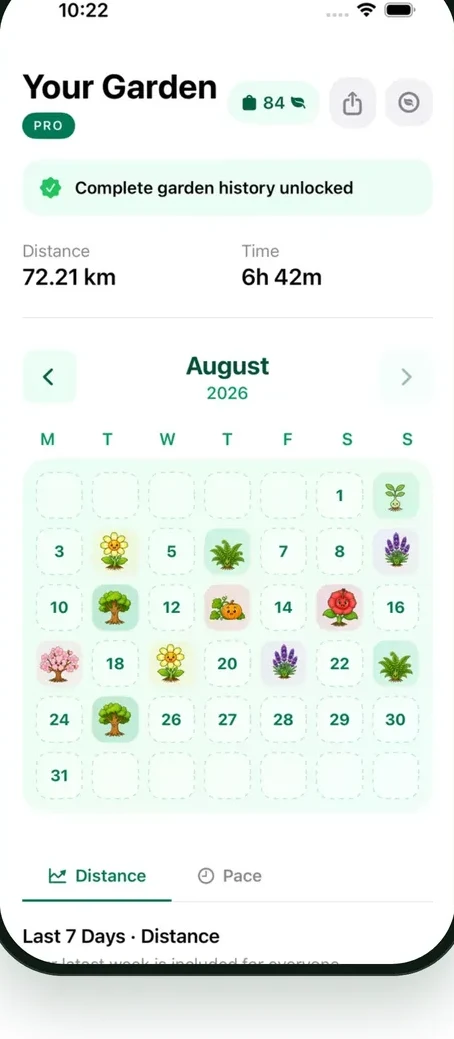
On iPhone, Apple Health is the best place to keep a copy of every run, because almost every running app can read from it. That is also how Run&Grow works: it reads runs from Apple Health, so a run recorded in MapMyRun counts as soon as it reaches Health. Every run grows a plant in your garden. There is no public feed and no pace shaming, and if you skip a week, your garden waits. Training for a half marathon? See how long it takes to run 13 miles at every pace, or check your splits with the pace calculator.
Compare more running apps
- Runkeeper not syncing with Apple Health? (8 fixes, both ways)
- adidas Running not syncing with Apple Health? (8 fixes)
- Nike Run Club not syncing with Apple Health? (8 fixes)
- Strava not syncing with Apple Health? (8 fixes, both ways)
- Garmin Connect not syncing with Apple Health? (8 fixes)
- Gamified running apps (apps that make running feel like a game)
Frequently Asked Questions
- Why is MapMyRun not syncing to Apple Health?
- Usually because the Apple Health switch is off or a category was not allowed. In MapMyRun tap the Menu (…) → Settings → Apple Permissions and turn on Apple Health, then check iPhone Settings → Apps → Health → Data Access & Devices → MapMy and tap Turn On All. Only new workouts sync, and maps and elevation are never sent.
- Does MapMyRun import workouts from Apple Health?
- No. MapMy’s help page says the app only sends workout information to Apple Health and does not import any workout information from it. Runs you record in Apple’s Workout app will stay in Health and will not appear in MapMyRun.
- Why are my MapMyRun maps missing in Apple Health?
- Because MapMy does not send maps or elevation data to Apple Health. Your distance, time and other workout data go to Health, but the route map stays in MapMyRun.
- Do I need MapMyRun MVP to sync with Apple Health?
- MapMy’s Apple Health help page does not mention MVP, and the app is free to download with in-app purchases, as of November 2026. See our page on whether Map My Run is free for what MVP adds.
- Will my MapMyRun runs count in Run&Grow?
- Yes, once they are in Apple Health. Run&Grow reads runs from Apple Health, so a run recorded in MapMyRun counts after MapMyRun sends it to Health, and it grows a plant in your garden. If it is not in Health yet, use the fixes above first.
Run&Grow · free iPhone app
A calmer way to keep running
- Free on iPhone
- Reads your runs from Apple Health
- No public feed, no pace shaming
4.6 on the App Store