You finish a run in Nike Run Club, it is saved in the app, but Apple Health is empty. Apple’s Community forums have thread after thread about this, with titles like NRC not syncing with Health and Fitness app not adding my runs from Nike Run Club. The Nike Run Club App Store listing says the app “works with Apple Health to sync workouts and record heart-rate data”, so the feature is there. When it fails, it is nearly always a switch, a missing data type, or looking in the wrong place. Here are the fixes in plain steps, as of November 2026.
First: what Nike Run Club sends to Apple Health
Nike Run Club writes to Health. Here is what goes where:
| Direction | What syncs | Setting | Main limit |
|---|---|---|---|
| Nike Run Club → Apple Health | Workouts, heart rate, active energy, walking and running distance (the examples Nike lists) | iPhone Settings → Privacy & Security → Health → Nike Run Club | Only the data types you switch on are shared |
| Apple Health → Nike Run Club | Not described on Nike’s help page as of November 2026 | None | Do not expect runs from other apps to appear inside NRC |
Sources, as of November 2026: Nike Help: How do I connect NRC to Apple Health? (steps and data types), Apple Support: Manage Health data (Health app permissions and data source order; September 2026) and the NRC App Store listing (iOS 18 or later, watchOS 10 or later).
8 fixes, in the order to try them
Check the run is in Nike Run Club first
Open NRC and look for the run in your Activity list. Apple Health can only get a run that NRC has saved. If the run is missing in NRC too, the problem is the recording or your Nike account sync, not Apple Health. See the NRC not working guide linked below.
Turn on Health access in iPhone Settings
This is the path on Nike’s own help page: open Settings → Privacy & Security → Health → Nike Run Club, then switch on the data you want to share. Turn on Workouts at the very least, plus Heart Rate, Active Energy and Walking + Running Distance.
Check the same switches in the Health app
Apple’s help page gives a second route: open the Health app, tap your profile picture, then under Privacy tap Apps → Nike Run Club. Make sure the categories you want are on. If Nike Run Club is not in the list at all, update and reopen the app: iOS only lists apps that have asked for Health access.
Open NRC and let it finish syncing
After a run, open Nike Run Club on your iPhone with Wi-Fi or mobile data on, and wait until the run shows as finished and saved. Then open Health → Browse → Activity → Workouts and look for it.
Look in the right place
NRC runs show up in Health under Workouts and in the distance and heart-rate charts. They are not always where you expect in other apps, for example in the Fitness app or in Activity rings, which many users mention in Apple Community threads. Check the Health app first: if the run is there, the sync is working.
Fix duplicates and gaps with Data Sources
If you record with an Apple Watch and NRC at the same time, Health can show two runs or pick the “wrong” numbers. In Health, open a data type (for example Walking + Running Distance), scroll down to Data Sources & Access, tap Edit and drag the source you trust to the top. A source with its tick removed is ignored.
Update the app and iOS, then restart
As of November 2026 the latest Nike Run Club needs iOS 18 or later on iPhone (watchOS 10 or later on Apple Watch). Update NRC from the App Store, install any iOS update, restart your iPhone and try again.
Switch access off and on again
Still stuck? In Settings → Privacy & Security → Health → Nike Run Club, turn everything off, then back on. If that does not work, sign out of NRC and back in. Reinstalling is the last step: before you delete the app, check your recent runs are in your Nike account so nothing is lost.
Run&Grow · free iPhone app
Make every NRC run count
- Free on iPhone
- Reads your runs from Apple Health
- No public feed, no pace shaming

4.6 on the App Store
What the sync will not do
Some “sync problems” are really limits. As of November 2026:
- It only goes one way. Nike describes data flowing from NRC to Health. Runs saved in Health by other apps (an Apple Watch Workout, Strava, a Garmin) do not show up inside Nike Run Club.
- Only the types you allow. If Workouts is on but Heart Rate is off, the run arrives without heart-rate data. Switch on every type you care about.
- Plan on new runs only. Nike’s help page talks about data flowing once you connect. Older runs stay in your Nike account.
- Nike features stay in Nike. Guided Runs, training plans, badges and challenges live in the NRC app; Health only gets the workout data.
Running with an Apple Watch too?
If you start a run on your Apple Watch with the Workout app and also in NRC on your phone, two sources record the same run. Pick one. Record in NRC on the watch or phone, or record in the Workout app and let Health keep it. Then set the order in Health → Data Sources & Access so the source you trust is on top. Comparing the two? See Nike Run Club vs Apple Fitness and our list of the best Apple Watch running apps.
Should you still use Nike Run Club?
If you like its Guided Runs and plans, yes. It is free, and is Nike Run Club free? explains what you get. If the app itself keeps breaking (crashes, GPS gaps, login loops), start with Nike Run Club not working?, or look at Nike Run Club alternatives. In the US, UK and Australia the Health settings are the same; only the menu names change with your iOS version (older iOS calls it Privacy instead of Privacy & Security).
Keep your runs safe in Apple Health
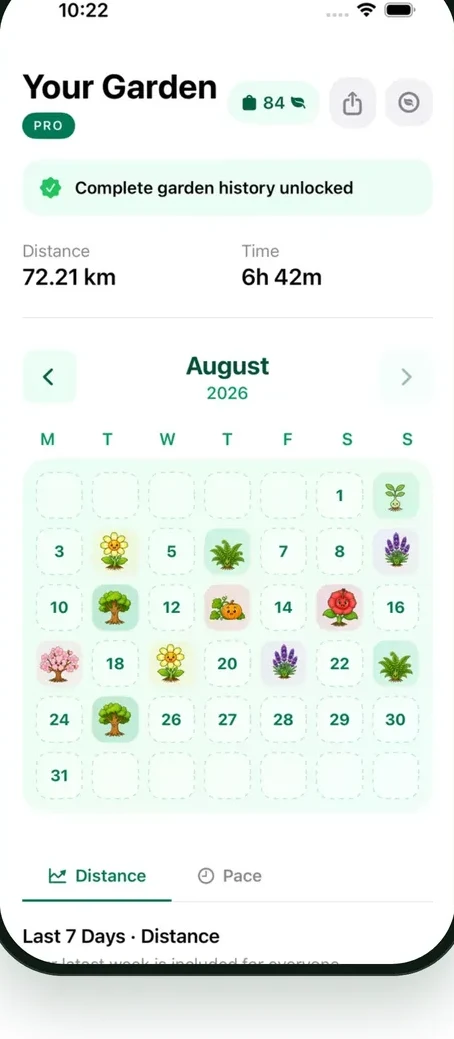
On iPhone, Apple Health is the best place to keep a copy of every run, because almost every running app can read from it. Once NRC is writing to Health, each new run is saved there as well as in your Nike account. That is also how Run&Grow works: it reads runs from Apple Health, so a run recorded in NRC counts as soon as it reaches Health. Every run grows a plant in your garden. There is no public feed and no pace shaming, and if you skip a week, your garden waits. Working up to longer runs? See how long it takes to run 20 miles at every pace, or check your splits with the pace calculator.
Compare more running apps
- Garmin Connect not syncing with Apple Health? (8 fixes)
- adidas Running not syncing with Apple Health? (8 fixes)
- Strava not syncing with Apple Health? (8 fixes, both ways)
- Nike Run Club vs Garmin Connect (and does NRC sync with Garmin?)
- Nike Run Club vs Strava
- Nike Run Club vs adidas Running
- Gamified running apps (apps that make running feel like a game)
Frequently Asked Questions
- Why is Nike Run Club not syncing to Apple Health?
- Usually because Health access is off or missing a data type. Open iPhone Settings → Privacy & Security → Health → Nike Run Club and turn on Workouts, Heart Rate, Active Energy and Walking + Running Distance. Then open NRC so the run finishes saving, and check Health → Browse → Activity → Workouts.
- How do I connect Nike Run Club to Apple Health?
- Nike’s help page says: open Settings, tap Privacy & Security, tap Health, tap Nike Run Club and choose the data to share. After that, Nike says data flows from NRC to Health automatically.
- Will my old Nike Run Club runs move to Apple Health?
- Do not count on it. Nike’s help page only talks about data flowing once you connect, so plan on new runs syncing from that point. Your older runs stay in your Nike account.
- Why do I see the same run twice in Apple Health?
- Two sources recorded it, usually an Apple Watch and Nike Run Club. In Health, open the data type, tap Data Sources & Access → Edit and drag the source you want to the top, or untick the one you do not want.
- Will my Nike Run Club runs count in Run&Grow?
- Yes, once they are in Apple Health. Run&Grow reads runs from Apple Health, so a run recorded in Nike Run Club counts as soon as NRC writes it to Health, and it grows a plant in your garden.
Run&Grow · free iPhone app
A calmer way to keep running
- Free on iPhone
- Reads your runs from Apple Health
- No public feed, no pace shaming
4.6 on the App Store