You finish a run, open Apple Health, and it is not there. Or you record a run on your Apple Watch and Strava never shows it. Both are common, and both usually come down to a setting, a permission, or a limit in how Strava syncs. This guide follows Strava’s own Apple Health help page (last updated September 2026, checked November 8, 2026), in plain steps.
First: which way is it not syncing?
Strava and Apple Health sync in two directions, and each one has its own switch and its own limits:
| Direction | What syncs | Switch in Strava | Main limit |
|---|---|---|---|
| Strava → Apple Health | Route, activity type, distance, time and calories | Manage Apps and Devices → Health → Send to Health | Routes from activities recorded by another company’s device or app (Garmin, Zwift) are not sent |
| Apple Health → Strava | Workouts recorded in Apple’s own Workout app | Manage Apps and Devices → Health → Automatic Uploads (or tap Import) | Only the last 30 days, and only the Apple Workout app; other apps’ workouts in Health do not come across |
Source: Strava support, “Apple Health and Strava”, as of November 2026.
8 fixes, in the order to try them
Work out which way it is broken
Strava and Apple Health sync in two separate directions with two separate switches. If your Strava runs are missing from Health, you need “Send to Health”. If your Apple Watch workouts are missing from Strava, you need “Automatic Uploads”. Fixing the wrong one changes nothing.
Connect Strava to Health
In the Strava app, open the You tab and tap the settings icon. Go to Manage Apps and Devices → Health → the plus icon → Connect. On the Health Access screen, turn on Workouts & Routes (and any other data you want shared).
Turn on Send to Health (Strava → Health)
Still in Manage Apps and Devices → Health, switch on “Send to Health”. New Strava activities then go to Apple Health with the route, activity type, distance, time and calories.
Turn on Automatic Uploads (Health → Strava)
In the same screen, switch on “Automatic Uploads” so new Apple Workout activities upload by themselves. For a single missing run, tap Import next to it instead. Strava only lists Apple Workout activities from the past 30 days.
Check your iPhone permissions
If a workout does not even appear in Strava’s import list, tap “Connect with Health” in that screen, then open iPhone Settings → Apps → Health → Data Access and Devices → Strava and turn on every data type Strava needs.
Give it a nudge
For Strava runs that are not showing in Health, Strava suggests this: force close the Health app, open Strava, and pull down on your You feed to refresh. Then open Health again.
Look for a duplicate
If Strava says a workout was imported but you cannot see it, it may be a duplicate. Strava does not allow two activities at the same time. Check your activity list for one with the same date and start time. Only delete it if you are sure it is the same run, then import again.
Update and restart
Install any Strava update from the App Store and any iOS update, then restart your iPhone (and your Apple Watch if you use one). A restart clears a lot of small sync glitches.
Run&Grow · free iPhone app
Make every synced run count
- Free on iPhone
- Reads your runs from Apple Health
- No public feed, no pace shaming

4.6 on the App Store
What Strava will not sync (even when it works)
Some “sync problems” are not bugs. They are limits Strava lists on its help page, as of November 2026:
- Only Apple’s Workout app comes in. Strava imports workouts recorded with the built-in Apple Workout app. A run another app saved to Apple Health (for example Nike Run Club) does not go on to Strava through Health.
- Only the last 30 days. Older Apple Workout activities will not show in Strava’s import list.
- No Garmin or Zwift routes out. Route information from activities recorded with another company’s app or device is not sent to Apple Health.
- No duplicates. If the same run is already on Strava (say, from your watch and your phone), the second copy is blocked.
If your problem is one of these, no setting will fix it. The fix is to record the run in the place that syncs the way you need, or to use the device maker’s own app to write to Apple Health.
Has Strava broken Apple Health sync before?
Yes, once in a big way. In early 2022 Strava stopped passing third-party activities (like Garmin and Zwift rides) to Apple Health, to cut down on duplicate uploads. After complaints from users, it turned the sync back on, as Cycling Weekly reported on March 16, 2022. If sync suddenly stops for lots of people at once, check Strava’s social channels or Reddit before you change your settings.
Keep your runs safe in Apple Health
On iPhone, Apple Health is the best place to keep a copy of every run, because almost every running app can read from it. Once Send to Health is on, your new Strava runs are stored there as well as on Strava. If you ever leave Strava, your history in Health stays with you.
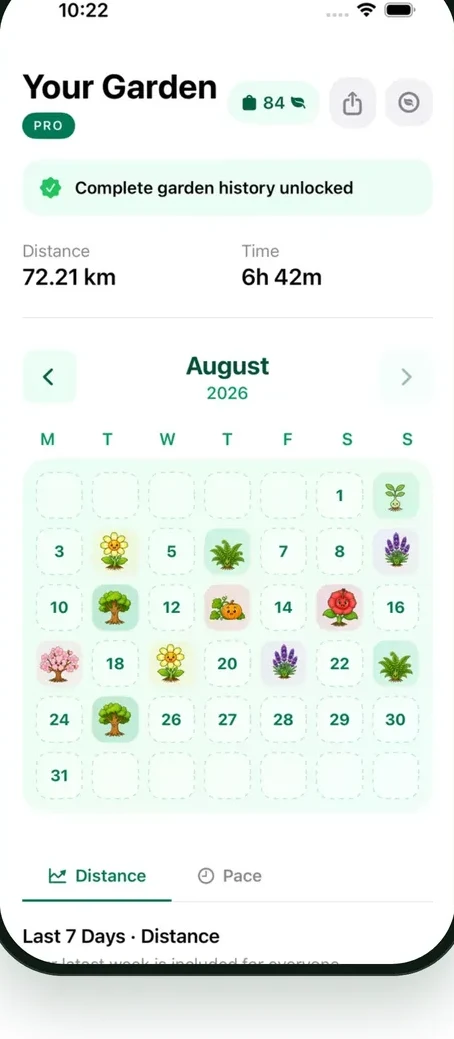
That is also how Run&Grow works. It reads runs from Apple Health, so a run recorded in Strava, in the Apple Workout app or on your Apple Watch can count, as long as it reaches Health. Every run grows a plant in your garden. There is no public feed and no pace shaming, and if you skip a week, your garden waits. Logging short runs? See how long it takes to run 3 miles at every pace.
Compare more running apps
- Is Strava free? (what the free plan includes)
- Strava Black Friday 2026 (is there a deal, and cheaper ways to pay)
- Strava alternatives (if you are ready to switch)
- Nike Run Club not working? (7 fixes for crashes and sync)
- Gamified running apps (apps that make running feel like a game)
Frequently Asked Questions
- Why is Strava not syncing to Apple Health?
- Most often “Send to Health” is off, or Strava does not have permission to write Workouts & Routes. In Strava go to You → settings → Manage Apps and Devices → Health and switch on Send to Health. If runs are still missing, force close the Health app, open Strava and pull down on the You feed to refresh.
- Why are my Apple Watch workouts not showing in Strava?
- Strava only imports workouts recorded with Apple’s own Workout app, and only from the past 30 days. Turn on Automatic Uploads (or tap Import) under Manage Apps and Devices → Health. If a workout says imported but is missing, look for a duplicate with the same start time.
- Does Strava send Garmin or Zwift activities to Apple Health?
- Not fully. As of November 2026, Strava’s help page says route information from activities recorded with another company’s app or device, such as Garmin or Zwift, does not sync to Apple Health. If you need those routes in Health, check whether your device’s own app can write to Apple Health directly.
- Can I sync my old Strava runs to Apple Health?
- Strava’s help page does not describe a way to send older activities to Health, and imports in the other direction are limited to the past 30 days. The safest move is to switch on Send to Health now, so every new run is saved in both places.
- Will my Strava runs count in Run&Grow?
- Run&Grow reads runs from Apple Health. If Send to Health is on and your Strava run shows up in Health, Run&Grow can read it and grow a plant in your garden for it. Runs that never reach Apple Health will not show up.
Run&Grow · free iPhone app
A calmer way to keep running
- Free on iPhone
- Reads your runs from Apple Health
- No public feed, no pace shaming
4.6 on the App Store