You finish a run on your Garmin, it shows up in Garmin Connect, but Apple Health is empty. This is one of the most common Garmin questions on iPhone, and the Garmin and Apple forums are full of threads about it. The Garmin Connect App Store listing says it can “sync with other apps like Apple Health”, so the feature is there. When it fails, it is usually a switch, a permission, or the way Garmin syncs. Here are the fixes, in plain steps, as of November 2026.
First: how Garmin and Apple Health sync
Unlike Strava, Garmin Connect mostly syncs one way. Here is what goes where:
| Direction | What syncs | Setting | Main limit |
|---|---|---|---|
| Garmin Connect → Apple Health | Completed workouts, steps, distance, heart rate, sleep, plus weight-type data such as body fat and BMI | More → Settings → Connected Apps → Apple Health | Only new activities; the Garmin Connect app has to be open on your phone for data to be written |
| Apple Health → Garmin Connect | Not offered for workouts as of November 2026 | None | Reading data from Health has been reported as coming, but Garmin has not confirmed what it will cover |
Sources, as of November 2026: Notebookcheck (data Garmin sends to Health; June 2025, updated October 2026), Hardcore Harry’s Garmin to Apple Health guide (menu path, “open app” and new-activities-only notes; verified August 2026) and StepBet’s Garmin + Apple Health guide (January 2026).
8 fixes, in the order to try them
Make sure the run reached Garmin Connect first
Apple Health only gets what Garmin Connect has. Open Garmin Connect and check the run is in your activity list. If it is not, the problem is between your watch and your phone (Bluetooth, or the watch not paired), not Apple Health.
Open Garmin Connect and leave it open
Several guides and Garmin forum users report that Garmin Connect only writes to Apple Health while the app is open in the foreground. After a run, open Garmin Connect and keep it on screen for a few seconds, then check Health.
Check the connection in Garmin Connect
Tap More (bottom right) → Settings → Connected Apps → Apple Health. If you see “Connect with Apple Health”, tap it. In older versions the menu is called 3rd-Party Apps instead of Connected Apps.
Turn on all the permissions
On the Health Access screen, tap “Turn On All”. If you only want some data shared, make sure Workouts, Distance and Heart Rate are on, or runs will arrive without their details (or not at all).
Check the Health side too
Open the Health app, tap your profile picture → Privacy → Apps (on some iOS versions just Apps) → Garmin Connect, and make sure the data types you want are allowed. A permission switched off here blocks the sync even when Garmin Connect says it is connected.
Force a sync
Pull down on the Garmin Connect home screen (My Day) to sync. Wait for it to finish, then open Health and look under Browse → Activity → Workouts.
Disconnect and reconnect
Still stuck? In Garmin Connect go to More → Settings → Connected Apps → Apple Health and disconnect, then connect again and turn on all permissions. This resets a connection that has quietly broken after an app or iOS update.
Update and restart
Install the latest Garmin Connect and iOS updates from the App Store and Settings, then restart your iPhone. Then open Garmin Connect, sync, and keep it open for a moment.
Run&Grow · free iPhone app
Make every Garmin run count
- Free on iPhone
- Reads your runs from Apple Health
- No public feed, no pace shaming

4.6 on the App Store
What Garmin will not sync (even when it works)
Some “sync problems” are really limits. As of November 2026:
- No old runs. Only activities recorded after you connect Apple Health are sent. Your older Garmin history stays in Garmin Connect.
- No sync in the background. Garmin Connect writes to Health while it is open on your phone. A run can sit in Garmin Connect for hours until you open the app.
- Nothing comes back. Workouts in Apple Health (for example from the Apple Workout app) do not go into Garmin Connect.
- No ECG. Notebookcheck lists ECG as data Garmin Connect does not send to Health.
- Garmin metrics stay in Garmin. Training load, Body Battery and similar Garmin scores are not Apple Health data types, so do not expect to see them in Health.
Bugs other Garmin users report
If everything above is set up and things still look wrong, you may be hitting a known issue. On the Garmin forums, users report that Garmin Connect re-sends roughly the last two weeks of activities and overwrites them in Health, wiping extra details such as effort ratings added in Apple’s apps. Others report duplicate workouts when both an Apple Watch and a Garmin write the same run. These are user reports, not issues Garmin has confirmed. For duplicates, fix the data source order in Health (see the FAQ below).
One workaround users mention: let Garmin sync to Strava, then let Strava send runs to Apple Health. It is free but carries fewer details. Strava has its own switches for this, covered in Strava not syncing with Apple Health.
Should you still use Garmin Connect?
If you own a Garmin watch, yes. Garmin Connect is free and is where your watch data lands first; is Garmin Connect free? explains what Connect+ adds. If the app itself is the problem, see Garmin Connect alternatives, or compare Strava vs Garmin Connect. In the US, UK and Australia the sync works the same way; the menu names only change with the app version.
Keep your runs safe in Apple Health
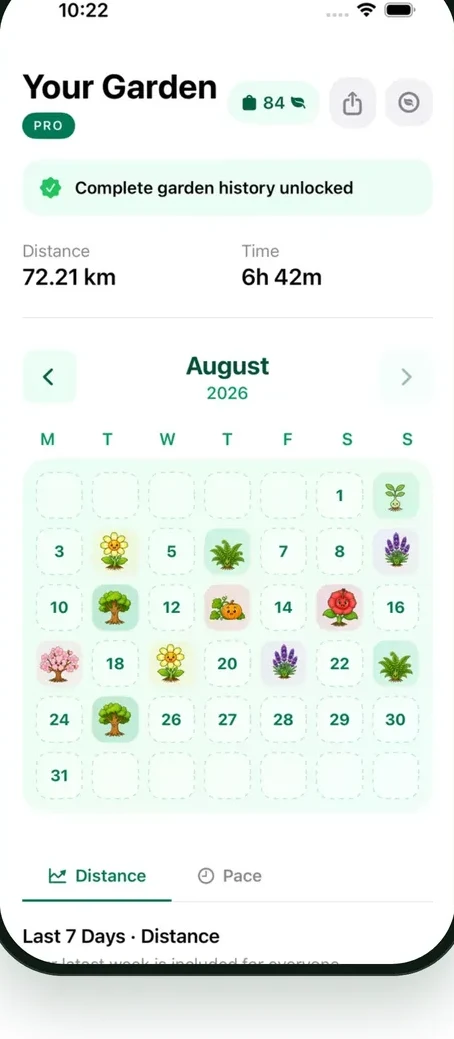
On iPhone, Apple Health is the best place to keep a copy of every run, because almost every running app can read from it. Once Garmin Connect is writing to Health, each new Garmin run is saved there as well. That is also how Run&Grow works: it reads runs from Apple Health, so a run recorded on your Garmin counts as soon as it reaches Health. Every run grows a plant in your garden. There is no public feed and no pace shaming, and if you skip a week, your garden waits. Building up long runs on your Garmin? See how long it takes to run 12 miles at every pace.
Compare more running apps
- Nike Run Club vs Garmin Connect (and does NRC sync with Garmin?)
- Strava vs Garmin Connect (do you need both?)
- Garmin Connect alternatives (other apps for your Garmin data)
- Strava not syncing with Apple Health? (8 fixes, both ways)
- Nike Run Club not syncing with Apple Health? (8 fixes for NRC runs)
- adidas Running not syncing with Apple Health? (8 fixes for adidas runs)
- Nike Run Club not working? (7 fixes for crashes and sync)
- Best Apple Watch running apps (if you run with an Apple Watch instead)
- Gamified running apps (apps that make running feel like a game)
Frequently Asked Questions
- Why is Garmin Connect not syncing to Apple Health?
- Most often the Apple Health connection is off or missing a permission, or the Garmin Connect app has not been opened since the run. Go to More → Settings → Connected Apps → Apple Health, turn on all permissions, then open Garmin Connect, pull down to sync and leave it open for a few seconds.
- Does Garmin Connect sync old activities to Apple Health?
- No. Only activities recorded after you connect Apple Health are sent. Runs from before that stay in Garmin Connect. If you need your full history somewhere else, export it from Garmin Connect or use a service that can copy it.
- Can Garmin Connect read workouts from Apple Health?
- Not workouts, as of November 2026. Garmin Connect sends data to Apple Health. Notebookcheck reported (June 2025, updated October 2026) that Garmin is expected to let Connect read some data from Apple Health, but Garmin has not confirmed what that will include.
- Why do I see duplicate runs or steps in Apple Health?
- Your iPhone, an Apple Watch and Garmin Connect can all write the same thing. In Health, open the data type (for example Steps), tap Data Sources & Access → Edit and drag Garmin Connect to the top. For duplicate workouts, turn off Workouts for the app you do not want as the source.
- Will my Garmin runs count in Run&Grow?
- Yes, once they reach Apple Health. Run&Grow reads runs from Apple Health, so a run recorded on a Garmin watch counts as soon as Garmin Connect writes it to Health, and it grows a plant in your garden.
Run&Grow · free iPhone app
A calmer way to keep running
- Free on iPhone
- Reads your runs from Apple Health
- No public feed, no pace shaming
4.6 on the App Store